Command line
Hellbox ships with a command line interface for rendering proofs without opening the app. Point it at font files and get a finished PDF, or automate exports and render checks on saved .fontproof documents.
Setup
The CLI lives inside the app bundle. Add an alias to your shell profile:
alias hellbox="/Applications/Hellbox.app/Contents/MacOS/Hellbox"Proof from Font Files
hellbox --proof renders a template-based proof straight from font files:
hellbox --proof MyFont.otf MyFont-Italic.otf proof.pdfPass one or more fonts followed by the output PDF path. Only compiled fonts are supported (.otf, .ttf, .ttc, .otc). Requires an active license or trial.
Flags:
--template "Name": which proof template to use. Default is “Pangram Proof”. Run--list-templatesto print the available names.--separate: write one PDF per font instead of one combined proof.--instances "Bold,Black Italic": choose variable-font named instances. Default is all named instances.--save-doc: also write the.fontproofdocument next to the PDF, so you can open it in Hellbox and refine it.
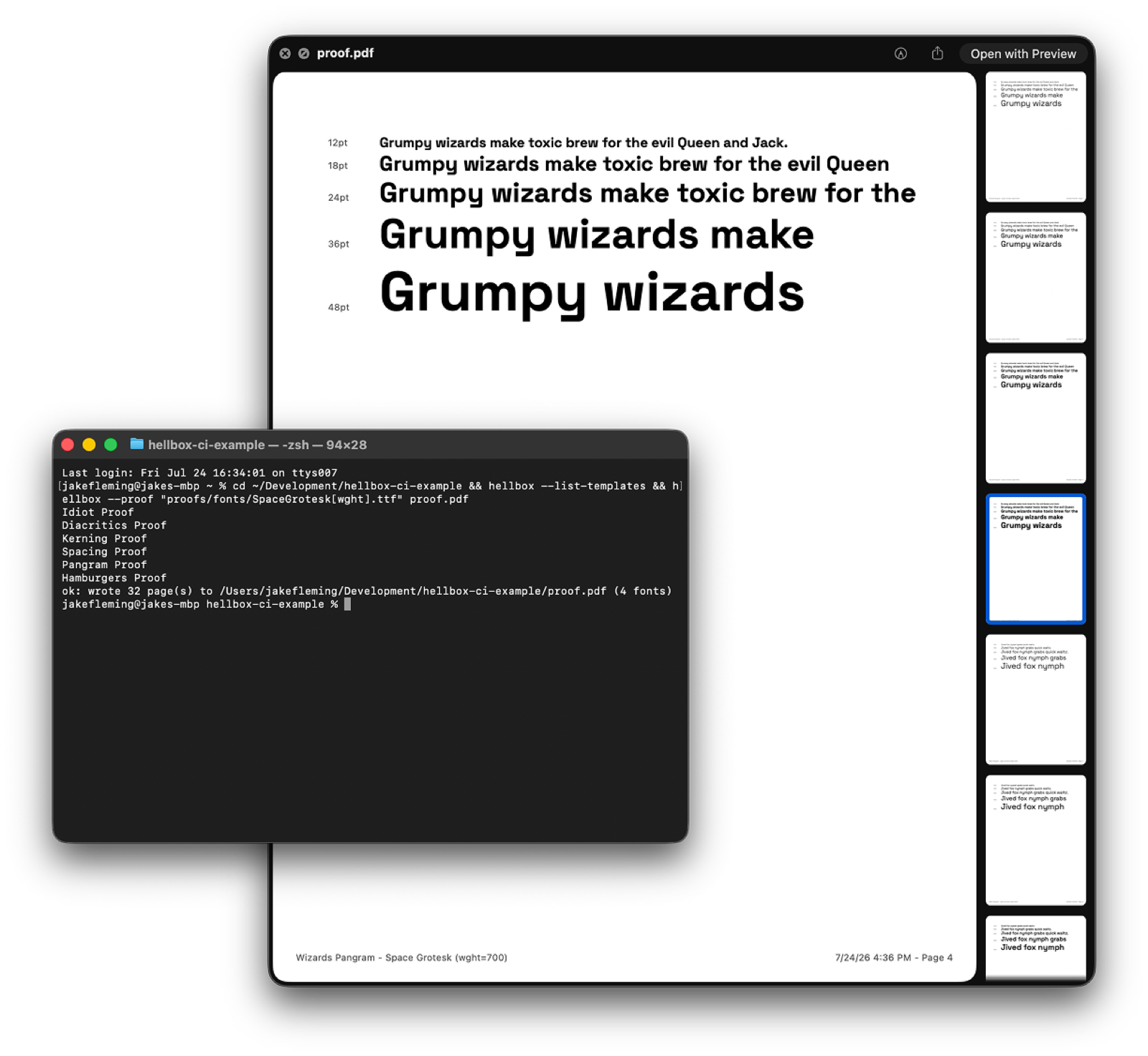 hellbox --proof renders a variable font’s named instances straight to a finished PDF
Document Commands
These work on saved .fontproof files and have no license gate:
hellbox --export in.fontproof out.pdf: export a saved document to PDF.hellbox --render-check in.fontproof: print JSON diagnostics, page count, page dimensions, character-coverage issues, and overflow issues.hellbox --render-pngs in.fontproof outDir [scale]: render each page to a PNG inoutDir. Default scale is 2x.
Recipes
Proof every font in a folder, one PDF each:
hellbox --proof Fonts/*.otf proofs.pdf --separateRegenerate a proof after each export from your editor, re-run the same command whenever your font editor writes a new binary:
hellbox --proof build/MyFont-VF.ttf proof.pdf --template "Pangram Proof"CI-friendly render checks, fail a pipeline on coverage or overflow issues by inspecting the JSON:
hellbox --render-check proofs/brand.fontproofRelated
For AI-assistant workflows, see the MCP server page. The CLI covers terminal and scripting workflows; MCP lets tools like Claude create and modify proofs conversationally.
Source fonts in saved documents
Saved .fontproof documents can reference .glyphs and .glyphspackage sources for headless rendering. Hellbox compiles them with its bundled fontc; the runner does not need Glyphs, Python, or fontmake. Commit the sources alongside the proof and preserve their relative locations. Named instances render at their own coordinates.
This applies to document commands such as --export and --render-check; --proof accepts the compiled font formats listed above.
If a document font cannot be resolved, --render-check reports it in fontIssues and sets the JSON ok field to false. Check that field or the issue list in your script; do not rely only on the command’s exit status. --export emits a warning. Check font resolution before accepting a PDF from an automated build.