FontLab 9 & Aidus
Ask Aidus to create a Hellbox proof from the font you’re editing. The first proof includes unsaved changes. After that, saving in FontLab updates the same proof in Hellbox.
You’ll need Hellbox 1.53 or later, FontLab 9, and an AI provider configured in Aidus. The connector installs automatically; FontLab still asks you to enable Python and approve scripts.
Connect the apps
- Launch FontLab 9 at least once so it creates its support folder.
- Open Hellbox 1.53 or later. Hellbox installs the Aidus connector automatically.
- Quit and reopen FontLab to load the connector, then open the font you want to proof.
Hellbox preserves your existing FontLab startup-script customizations. If you installed Hellbox while FontLab was already open, that restart matters.
Set up Aidus
Open FontLab → Preferences → Aidus and enter your AI provider’s connection details:
- API base: your provider’s API address.
- API key: a key from that same provider. Paste it only into FontLab’s API key field.
- General model: the provider’s model identifier for chat. Aidus uses this model to interpret your request and run the connector.
The provider, API base, and model identifier must agree. For example, an OpenRouter model identifier should not be used with a direct OpenAI API connection.
Glyph image model is for generating glyph images in FontLab. Hellbox proof creation does not use it, so you do not need to configure image generation for this workflow.
Allow external MCP clients to control FontLab is not required. The Hellbox connector runs through Aidus inside FontLab.
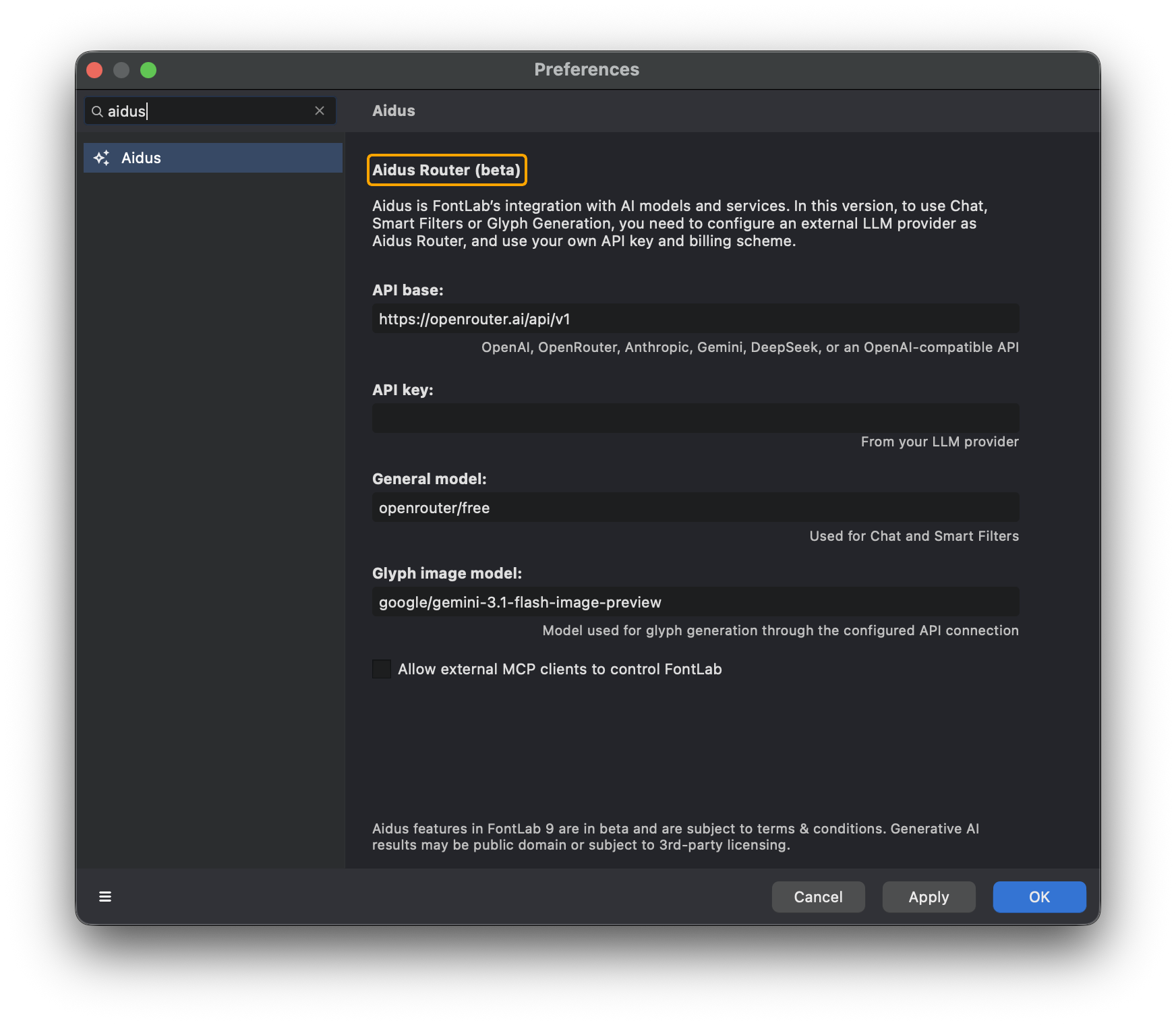 Aidus preferences before adding a key. This example shows FontLab’s OpenRouter defaults; enter the connection details for your own provider. The API key field is intentionally empty. Click the image to enlarge.
Click OK to save your settings.
Create your first proof
- Open Window → Panels → Chat in FontLab.
- Send
/python onto enable Python for the chat. - Ask Aidus to create a proof. Try:
Create a proof in Hellbox from the current font, using Hamburgefontsiv at 12, 18, and 36 pt.
- When FontLab asks to run the script, review and approve the call to
hellbox.create_proof. - Hellbox opens the new proof. Keep both apps open while you work.
The connector copies the current font into a proof snapshot, including changes you haven’t saved. Creating a proof does not save over your source font.
You can describe the text and sizes you want in ordinary language. Aidus chooses how to translate your request, so check the resulting proof just as you would any generated document.
Keep the proof updated
Leave Live Reload enabled in Hellbox. Edit your font in FontLab, then save it: Hellbox refreshes the existing proof automatically after a short delay.
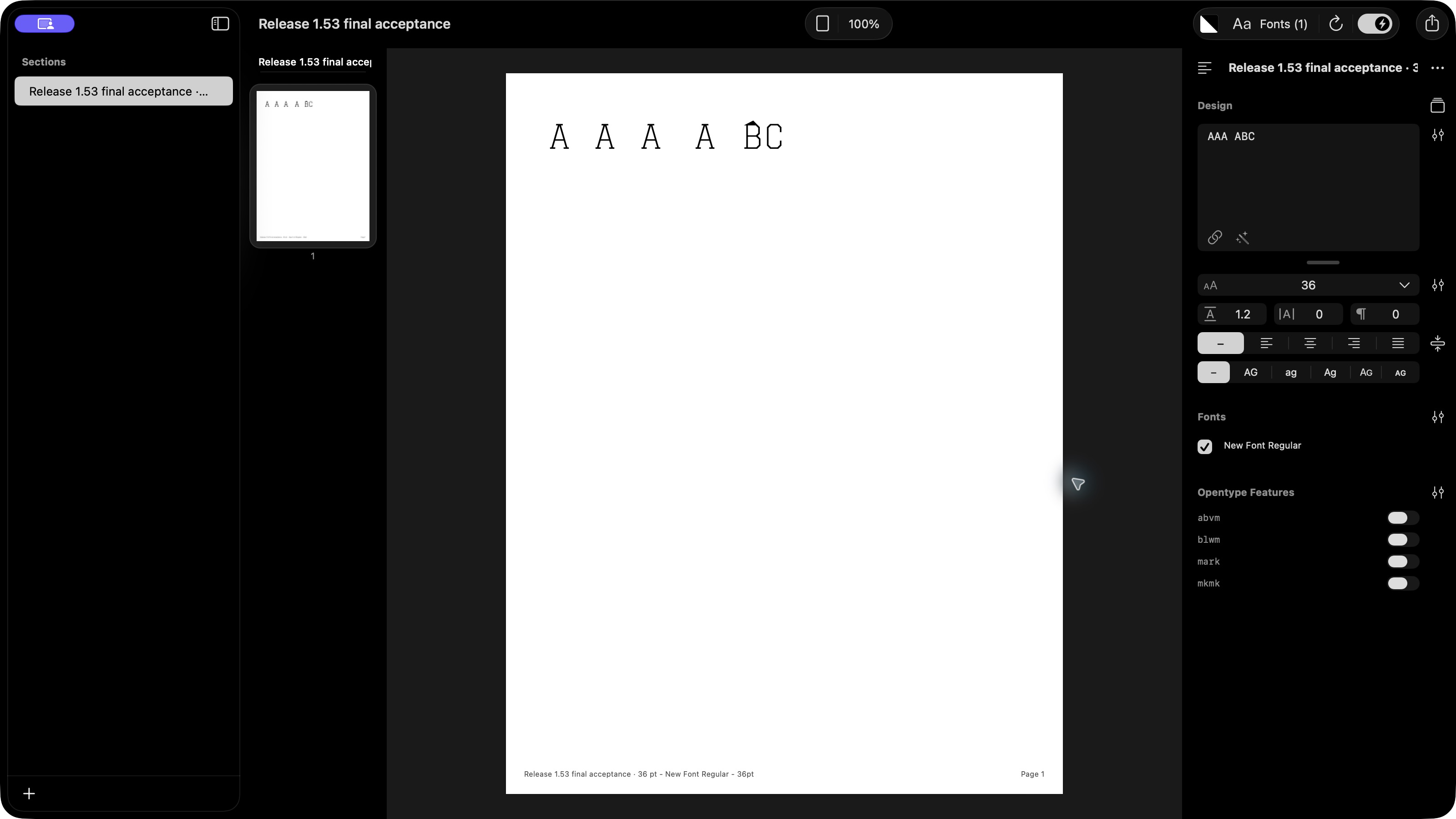 An Aidus-generated test proof in Hellbox. The lightning switch beside the refresh arrow in the upper-right toolbar enables Live Reload. Click the image to enlarge.
| Action in FontLab | What happens in Hellbox |
|---|---|
| Ask Aidus for a new proof | Captures the current font, including unsaved edits. |
| Continue editing without saving | The existing proof stays at its last captured state. |
| Save the font | Refreshes the linked proof when Live Reload is enabled. |
| Use Save As while the font remains attached | The link follows the open font to its new source path. |
| Restart the apps | Saved source links persist. |
For sources other than VFJ, keep the font open in FontLab so the connector can refresh its snapshot. To proof a later unsaved state without saving, ask Aidus for another proof.
Jump back to FontLab
In Hellbox, Command-click a glyph to open it in FontLab. To send a whole string, select text in the proof and press Return.
These round trips use the FontLab live-sync helper. If the font does not open, check that FontLab is running and has been restarted since Hellbox installed the connector.
Variable fonts
Variable VFJ sources currently render the default master. The Aidus connector does not add VFJ axis interpolation.
For axis sliders and interpolated proofs, export a variable font or add a designspace source to Hellbox. See Variable fonts.
Troubleshooting
Aidus says it needs an AI connection. Check Preferences → Aidus. Your API base, key, and general model must belong to the same provider connection.
Aidus cannot find the Hellbox connector. Open Hellbox 1.53 or later, then quit and reopen FontLab. Launching FontLab once before Hellbox lets the installer find its support folder.
The chat describes a proof but does not create one. Send /python on, then ask it to create the proof using hellbox.create_proof. Approve FontLab’s script prompt when it appears.
A proof stops refreshing. Check Live Reload in Hellbox, save the source in FontLab, and allow a few seconds for the refresh. For non-VFJ sources, leave the font open in FontLab.
Unsaved changes do not appear in an existing proof. This is expected: the initial proof captures unsaved edits, and subsequent updates happen on save. Ask for a new proof to capture another unsaved state.